Wednesday, September 30, 2015

Pattern Tutorial

Hey guys! Today I'll be showing you how to make a basic pattern on Adobe Illustrator.

1. Create an art board, and it's usually a good idea to make your width and height a square 
2. Just for this tutorial I'll make a basic shape and show you how to give it a paper effect. When making the star, press the ~ button in the top left hand corner of your keyboard, if you're on a mac. When you start to drag out, it should start to look like this.
3. Since this specific short cut is creating individual stars, select the whole pattern and group it all together, now we're time for the pattern making.
4. Select the shape and go up to Object > Pattern > Make
5. Illustrator will now take you to pattern mode and you can do a couple different things from here. As you can see on the picture to the right, this panel should come up when you go into pattern mode and first, of course, name your pattern so you can tell them apart.
6. Go to the drop down box in the tile type box and select brick by row, in the future you can choose any of these but for this tutorial I'll just be showing you this one. 
7. In the upper left hand corner of the pattern options box, you'll see a little button that looks like two boxes going away from each other. Click that and now a blue box should show up around your original pattern and you can change the size of that to determine how close or far you want your shapes to be from one another. In the overlap section, feel free to choose which one you would like to be on top of each other or behind each other.
8. You can then press done at the top of the page and the pattern should go away and the original pattern will be there. Select it, and move it out of the way so your able to show your new pattern. Create a normal rectangle on top of the art board and choose a fill color.
9. Over in the swatches panel, you should now see a little version of your pattern. Make another rectangle over the other one and click your pattern in the swatches panel and it should show up over the rectangle! 

I hope you guys enjoyed this tutorial! Happy pattern making!

Wednesday, September 23, 2015

HTML Colors!

Today we'll be reviewing Hexadecimal codes, RGB, and RGBa. All 3 codes involve colors, but can give them different forms or give them a different look, or also how much we control the shade of the color.

Hexadecimal Codes


Starting off with Hexadecimal codes, you can use letters and numbers, and they can either be 3 or 6 characters. It ranges from 0, being black, to 9 and then A to F, being white. Any of the numbers or letters in between can determine what shade of color you'd like, and usually the characters are in pairs and they can be either red, green, or blue and you can higher or lower the codes on those to establish different colors.


RGB & RGBa Codes


RGB coding involves no pound sign (#), no letters, 3 numbers, and it can go up to the number 255.You can use this for regular coloring, but if you want to add some transparency you can set your settings to RGBA. The only difference is that there are 4 numbers in RGBA, it can go up to the number 225, and the A at the end stands for alpha and is used to determine the transparency. It normally ranges from 0-1. Zero being see through and 1 being almost a completely white background. You can use the numbers in-between, such as 0.2 and 0.8, to determine how much you want to see through your box.


Above is what an RGBa code would look like, you can see the last number, the alpha, is a decimal and since I want my box to be partially see through, I made it a low number and the other 3 numbers just determine what shade I want the background to be.

We need this skill to make websites and we want to make a box with information in it, but have it show through to some pictures in the background. Anyone wishing to have maybe a slideshow in the background or a lighter feeling of their website should use this tool because they can still have information about their website on their page but at the same time being able to see the whole thing.

In conclusion, there are many different ways to use color codes and many different ways you can make them appear.

Below are some websites you can access to make you codes the best of the best:

HTML Color Picker
Color Explanations
RGB Color Channels

Friday, September 4, 2015

My Creative Objects


In my creative pencil, I made a couple different pencils before deciding what parts I liked best and put them together to make a pencil I really liked. My favorite tool was the pen tool because you can draw anything and then you can modify it any way you wish. In my honey and honeycomb design, I got inspiration from Winnie the Pooh and how much he loves honey, and it inspired me to make this honey jar. I used the paint brush tool to get the honey drip on the jar, as well as on the comb.


Thursday, August 20, 2015

What Is Graphic Design?

Graphic design. What is it? Why do people do it? How is it a part of our everyday lives? The great thing about graphic design is that it isn't just a job or something we like to admire. Graphic design is designing your imagination. Graphic design is making our thoughts become visible.

So why do people pursue it? What makes someone wake up one day and go to work as a graphic designer? I read a few blogs and watched a few videos, and I came up with a few answers for you. Graphic design, to me, is creating a moment people can understand and making people see past the product and seeing what's behind the design, and thinking about the product like it was going to be your own. It's about understanding the consumer and what they like or dislike and creating something that defines who they are, and maybe along the way we discover who we are in terms of graphic design and where we belong.


One of my favorite forms of graphic design is typography. I love the concept and the process and how it always looks different and means something else every time you look at it. Like the picture on the right, I love making and seeing things that are more than what they show, and showing a sentence hidden in the same words.


Psychology for Photographers

Like graphic design, photography is one of my many hobbies, and it can also be tied in or I can use my photos to influence my designs. The cool thing about graphic design is that it can be anything you want, it can be interior design, art, or even marketing. Any profession you do is probably going to have graphic design, and that's the joy of it. Even doing graphic design in high school really influences my thoughts and how I look at things, and I suppose that's what graphic design is. Creating, shaping, and changing the world.

Then and Now


This is Club Penguin 2005 vs 2015. Obviously, the layout has changed drastically and while they look quite similar, the 2015 version is a little big more detailed and gives the website more attraction, but the 2005 version gives more information on the home page and 2015 shows more of what it looks like inside the website. The coding used in 2005 used a lot more
and while the 2015 coding is more
and class coding.  


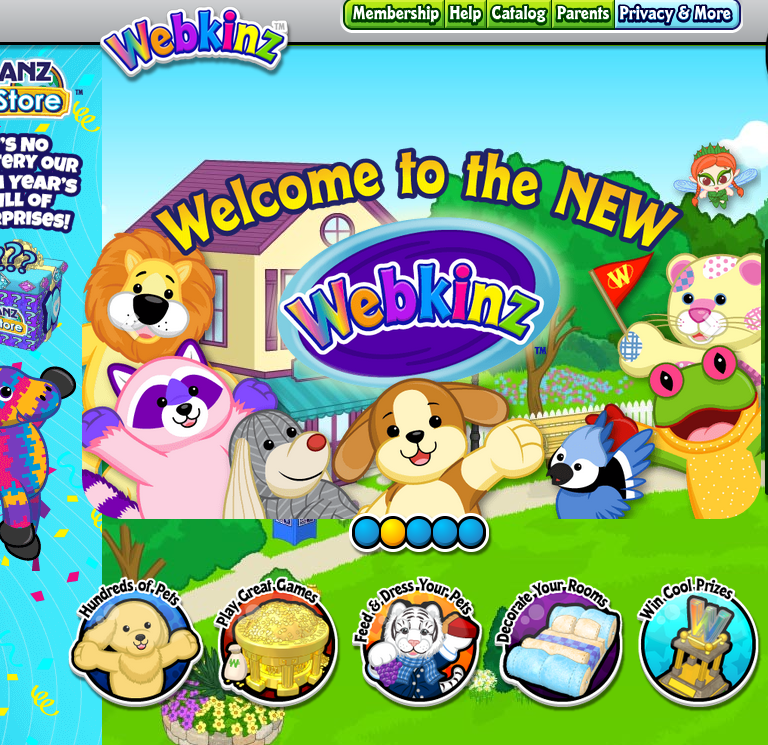
Webkinz 2005 vs 2015.  2005 was more of a click and go and basically showing you some of the things your pets can do, and the 2015 version shows more ads and merchandise and shows through slides what you can do inside Webkinz. The coding is different in that the 2005 version shows less options of where to go, therefore less coding, and the 2015 coding has more tabs and more links to click making a larger coding.


Skype 2004 was very... old. The buttons were robotic and while in the 2004 version, it gave a lot of information on what you could do, the 2015 version has more of a slide show, making it look more appealing to the eye while at the same time giving us the same information we would get from the 2004 version. They also changed the color concept from red to blue. The 2004 coding was more spacious and had lots of wording, and Skype 2015 was laid out to be more tight and while maybe it's the same amount of writing, it's not all at once, and gives us more understanding of what the software  can do.

Tuesday, May 19, 2015

Final Project - Shoe Fold


 This is the commercial I made, and during this process, everyone helped out and we put all of our editing features that we liked and put them together to make one with all of our ideas.


These are some of the pages I made for the website, I created the website itself and then wrote content for these pages. I was also in charge of reminding everyone of what they needed to do and things such as where and how to put their picture in the website.


This is the animation, I created the overall video and Delaney created the Shoe Fold shown in the video.


Our process was using all of our technical programs and created all different options that we liked and choosing the best one or making another one that fit different opinions throughout our team. Getting the idea together was something all of us had to do and once we had the main idea we all incorporated our thoughts and changed our idea until we thought it was suitable enough and something we could actually make. In the production process, we taped or made different versions of the commercial, animation, and logo in order to get the feel of the final choice. Along the way, I learned new ways to use our software and better ways to communicate with a bigger team in a bigger project, and it gave us the feel of what working with an actual work space would be like. Next time, I would definitely get more thoughts, whether its a teacher or another adult, and get suggestions on what would make them like the product better. I would keep our process the same because overall we worked well together and didn't have to make any harsh decisions. From this experience, I can definitely say that I would get more communication throughout my group next time I work on a project like this.

Overall, I loved this project because it gave us more experience and reminder with things we might've worked with before, but not on our own, and I'm glad we got to use the software in our own way and sort of figure things our ourselves with the occasional help from my team.

Friday, April 10, 2015

Shoe Fold Commercial


During the filming of this commercial, I learned that sometimes you have to take charge for some things to get done, no matter how mean you may sound. Working together as a group to create something bigger can be difficult in agreeing what your different visions might be in order to create the whole product. I also learned that when you put all your visions together, it can create something that you might end up liking in the end. It's also good experimenting with the different tools that we weren't maybe able to use while filming other projects. In order to keep everyone in your group in check, you sometime have to get them moving and help them out if they don't know how to place some things. You also want to get everyones opinion after filming to make sure everyone agrees on the final product. Next time, I would get multiple angles for each shot to see which one we like better.